Recipe Comparison
The same photographs, developed in every recipe. Pick two and drag the divider.
Every image is rendered by the camera itself and verified from its metadata. How this works
A
B
Star the recipes you like and they pin to the top of these pickers.
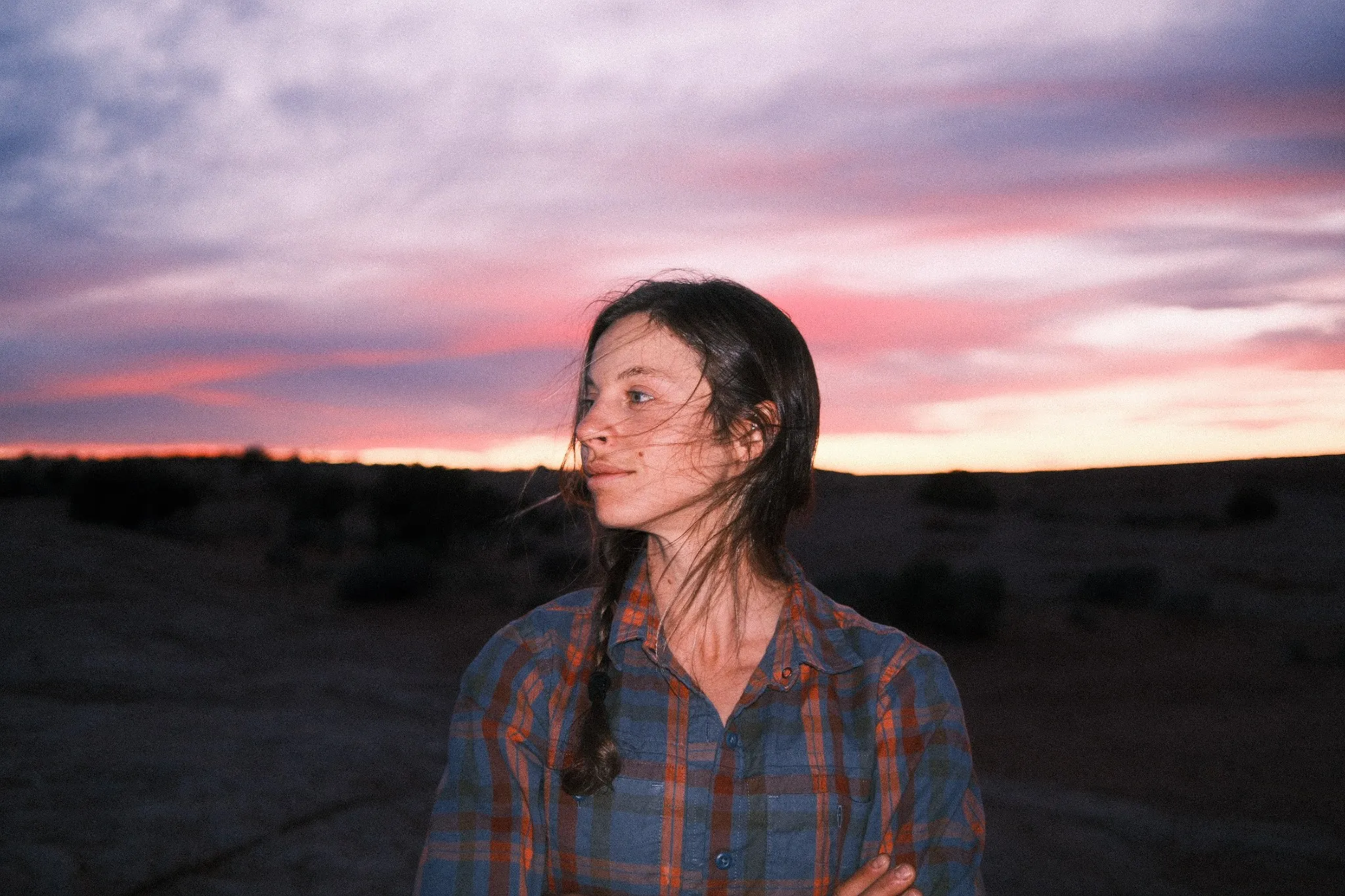
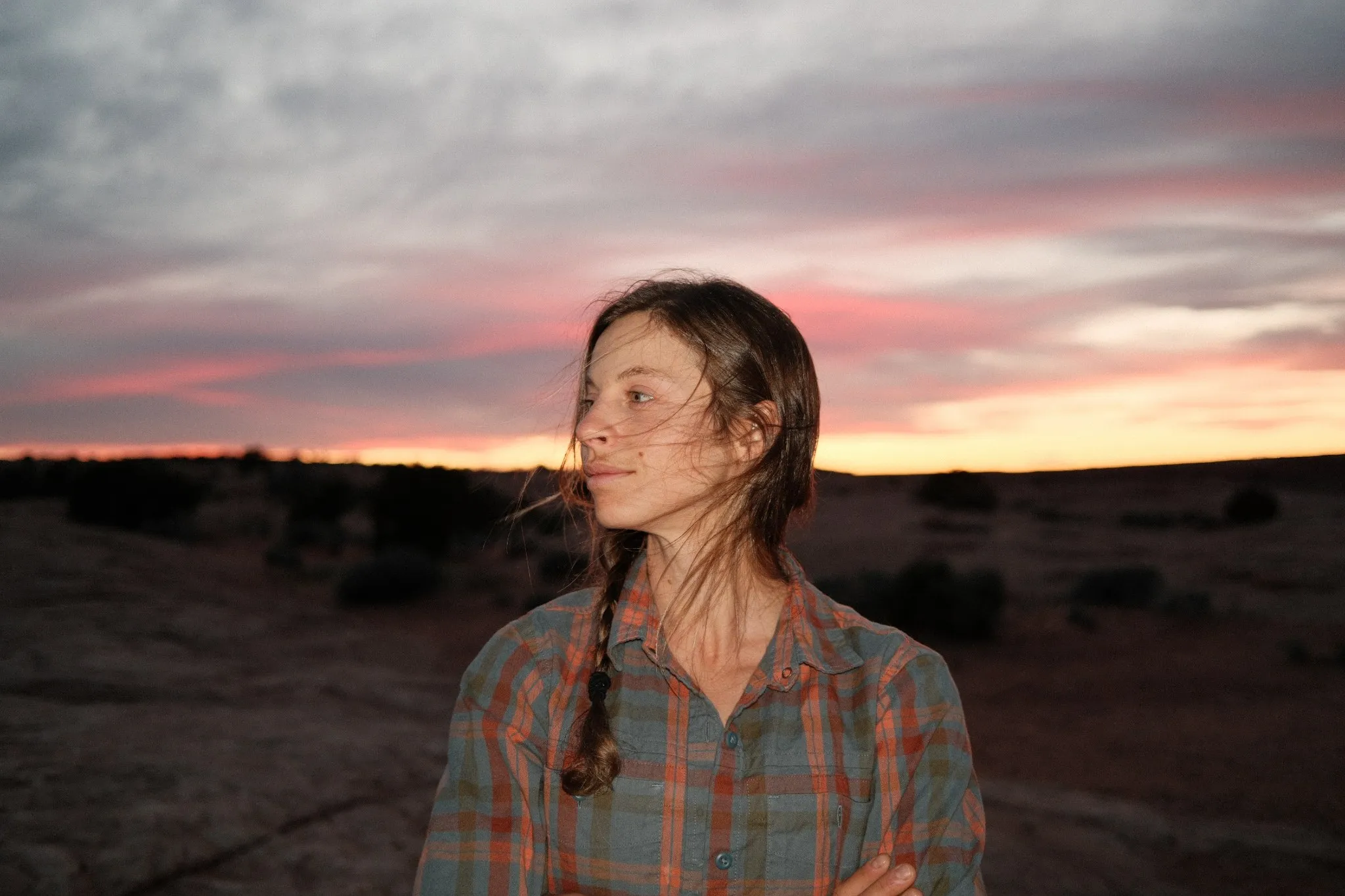
Kodak Royal Gold 400Reggie's Portra
Same photo, two recipes. Drag the divider, or focus it and use ← →.
Portrait, photographed by Cody Blue
The gallery is just getting started.
7 reference scenes so far, each developed in-camera across the full recipe catalog, and we're still testing the pipeline. Contribute a photograph and every comparison ever made with it carries your name and your link, like the credit above.
The full recipe
9 settings differ, highlighted below.
| Setting | Kodak Royal Gold 400 | Reggie's Portra |
|---|---|---|
| Film Simulation | Classic Negative | Classic Chrome |
| Dynamic Range | 400 | 100 |
| Grain | Strong | Weak |
| Grain Size | Small | Small |
| Color Chrome | Strong | Strong |
| Color Chrome Blue | Weak | Weak |
| White Balance | Shade | Auto |
| WB Shift | R+3 B+5 | R+2 B-4 |
| Highlights | -1 | -1 |
| Shadows | +1 | -1 |
| Color | +4 | +2 |
| Sharpness | -1 | -2 |
| Noise Reduction | -4 | -4 |
| Clarity | -3 | 0 |
How this works
A photographer submits a RAW file. We connect a real Fujifilm camera over USB and have its processor develop that one file in every recipe in the catalog, using the same in-camera engine that develops your photos when you shoot. Each render's settings are verified from the camera's own metadata before it's published.
Is this really the camera, or a software simulation?
Really the camera. Every image here is a JPEG developed by a Fujifilm camera's own processor. We send the photographer's RAW file to the camera over USB with a recipe's settings, and the camera develops it exactly as if it had been shot that way. No Lightroom, no presets, no emulation.
Is it the same photo in every recipe?
Yes. Each scene is one single RAW file, developed once per recipe. Everything that changes between two renders is the recipe: same light, same moment, same exposure.
How do you know a render actually matches the recipe?
Every developed JPEG carries the camera's own record of the settings used, written into its metadata. We read that back and verify it against the recipe before a render enters the gallery.
Why is a recipe missing on some scenes?
Physics, mostly. DR400 recipes need the shot to be taken at ISO 500 or higher, and DR200 at ISO 320 or higher; below that the camera refuses. A few recipes also use settings the USB conversion can't reproduce (like toned black-and-whites); those wait rather than render wrong.
Popular comparisons
- Classic Cuban Negative vs Reggie's Portra
- Classic Chrome vs Classic Negative
- Acros vs Monochrome
- Reggie's Portra vs Leica X
- Reggie's Portra vs Kodak Portra 400
- Reggie's Portra vs Pacific Blues
- Reggie's Portra vs Classic Chrome
- Classic Cuban Negative vs Leica X
- Classic Cuban Negative vs Kodak Portra 400
- Classic Cuban Negative vs Pacific Blues
This tool is part of Focal Click.
The place where Fujifilm recipes are proven: compared on the same scenes, read from real files, and shot by the photographers who bring them.
Explore recipes
32 community recipes, proven by 96 real photos. Every setting is read from EXIF, never typed in.
Recipe Extractor
Drop any straight-out-of-camera JPEG and read the exact recipe it was shot with. Free, in your browser, nothing uploaded.
Join free
Keep your favourite recipes on every device, post your shots, and put your name on recipes you bring first. The account is free.
Want a recipe added to the gallery, or found a bug? Tell me. Focal Click is built by one photographer, and you can support it.